
Vendora Product Overview
One Procurement Flow from Forecast to Payment
Vendora is a SAP/ERP-connected vendor management and supplier collaboration platform that helps procurement teams manage the complete purchasing journey from forecast, supplier readiness, RFQ, purchase order, vendor acknowledgement, ASN, GRN, quality checks, invoice submission, and payment tracking. Built for mid-to-large procurement teams, Vendora gives buyers, vendors, finance, stores, quality, IT, admins, and leadership teams one structured workflow for visibility, control, accountability, and supplier collaboration.Forecast to Payment
Connect demand, supplier readiness, RFQ, PO, shipment, GRN, invoice, and payment workflows.Vendor Self-Service
Let suppliers respond, confirm, upload documents, submit ASN, raise tickets, and track status.ERP Collaboration Layer
Keep SAP or ERP as the system of record while Vendora improves vendor-facing execution.Audit-Ready Control
Maintain role-based access, approval history, document traceability, exception logs, and workflow records.Vendora Connects Procurement Execution and Supplier Communication
Fragmented Updates
Forecasts, vendor confirmations, shipment details, GRN status, invoice progress, and payment visibility often live in disconnected channels.Manual Follow-Ups
Buyers and finance teams spend too much time asking vendors for updates and answering repeated status questions.Limited Accountability
Without a connected workflow, it becomes difficult to see who owns the next action, which transaction is delayed, and where exceptions are stuck.Full Procurement Flow from Forecast to Payment
Forecast
Onboarding
RFQ
PO
ASN
GRN / Quality
Invoice / Payment
Vendora Product Dashboard Preview
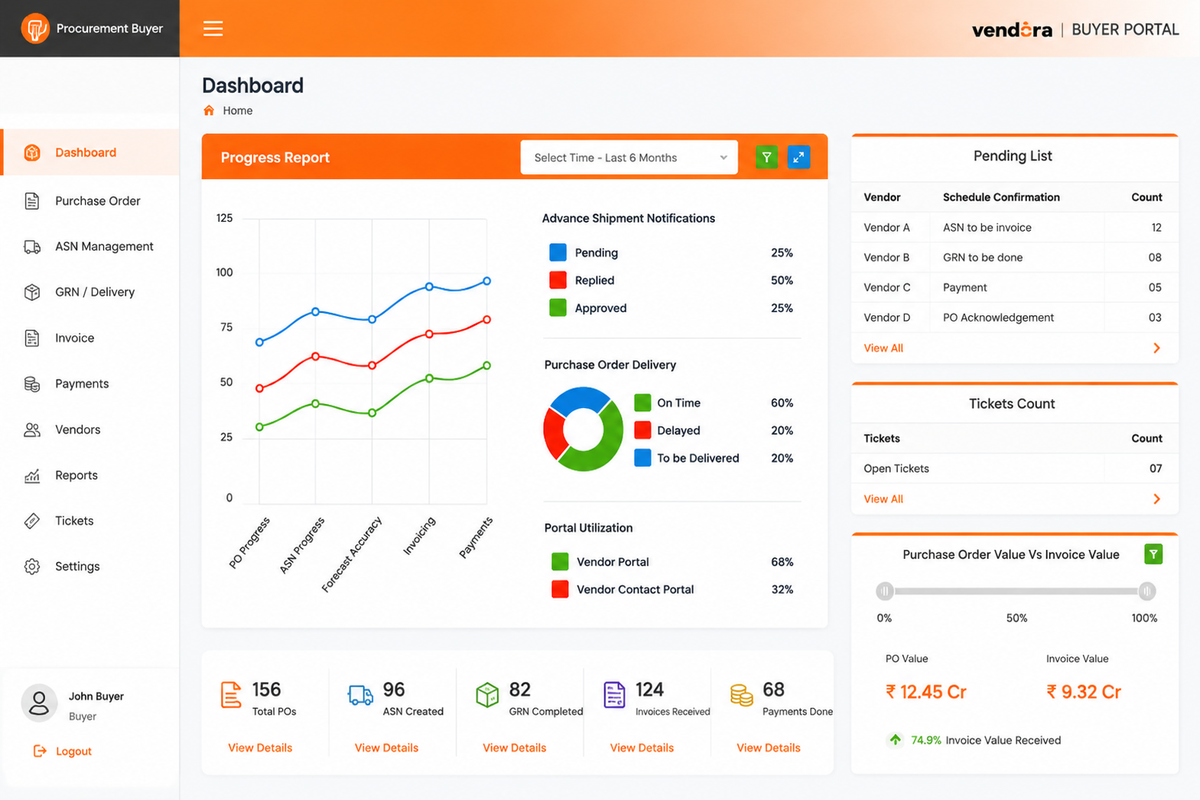 Example product overview dashboard view for monitoring procurement stages,
supplier actions, pending approvals, exceptions, and vendor performance.
Example product overview dashboard view for monitoring procurement stages,
supplier actions, pending approvals, exceptions, and vendor performance.8 Workflow Sections Inside Vendora
1. Forecast and Demand Visibility
Convert forecasted demand, production schedules, MRP outputs, or purchase requests into supplier-facing procurement activity.- Demand visibility
- Material and quantity details
- Required delivery dates
- Supplier assignment context
2. Supplier Readiness and Onboarding
Invite suppliers, collect profile information, validate documents, and prepare vendors for operational transactions.- Supplier profile
- Tax and bank details
- Compliance documents
- Approval history
3. RFQ and Supplier Selection
Create RFQs, collect quotations, compare supplier responses, negotiate terms, and shortlist the right vendor.- RFQ creation
- Supplier quotations
- Price comparison
- Final selection status
4. PR, Approval and PO Release
Manage purchase request and purchase order execution with approvals, ERP references, and supplier acknowledgement.- PR and PO details
- Approval status
- Vendor acknowledgement
- PO response tracking
5. Vendor Commitment and Exceptions
Track vendor confirmations, production readiness, delivery commitments, partial quantities, delay reasons, and exception tickets.- Confirmed quantity
- Committed delivery date
- Delay category
- Escalation owner
6. ASN and Dispatch Documentation
Let vendors submit advance shipment details before goods arrive, helping receiving and stores teams prepare earlier.- ASN number
- PO reference
- Vehicle and transporter details
- Dispatch documents
7. GRN, Quality and Exception Handling
Connect receiving, goods receipt, quality inspection, accepted quantity, rejected quantity, and discrepancy handling.- GRN number
- Received quantity
- Inspection result
- Corrective action notes
8. Invoice and Payment Tracking
Help vendors submit invoices with required documents and give finance, buyers, and vendors controlled status visibility.- Invoice submission
- Mismatch status
- Payment reference
- Payment date visibility
Connected Reports and Audit Trails
Turn procurement activity into dashboards, vendor performance reports, exception history, and audit-ready workflow records.- Vendor performance
- Workflow exceptions
- Approval history
- Document traceability
What Buyers, Vendors and Admins Do Inside Vendora
Buyers and Procurement Teams
Review demand, create RFQs, release purchase orders, monitor vendor acknowledgements, track delivery risks, view ASN and GRN status, coordinate exceptions, and review invoice readiness.Vendors and Suppliers
Update company information, respond to RFQs, acknowledge POs, confirm commitments, create ASN entries, upload documents, track GRN status, submit invoices, and view payment progress.Admins and IT Teams
Configure users, roles, permissions, forms, workflow rules, document requirements, integration mapping, exception categories, notifications, and audit settings.Finance Teams
Track invoice readiness, mandatory documents, invoice status, payment visibility, reconciliation checkpoints, and vendor payment queries.Stores and Quality Teams
Review incoming ASN, goods receipt, GRN status, accepted quantity, rejected quantity, quality checks, discrepancy reasons, and inspection outcomes.Leadership Teams
View dashboards, delays, exception trends, supplier performance, procurement cycle health, invoice aging, payment query volume, and vendor accountability.What Data Moves Through Vendora?
| Stage | Core Data | Who Updates It? | Where It Is Used Next |
|---|---|---|---|
| Forecast / Demand | Material, quantity, date, plant, demand source, and planning status. | Buyer, ERP or planning source, admin rules. | RFQ, PR, and PO planning. |
| Vendor Onboarding | Vendor profile, tax details, bank details, certifications, and contacts. | Vendor, buyer, admin approver. | Vendor master, access control, and sourcing eligibility. |
| RFQ / Quotation | Item, price, terms, lead time, quote remarks, and attachments. | Buyer and vendor. | Supplier selection and PO creation. |
| PO / Acknowledgement | PO number, price, quantity, schedule, terms, and confirmation status. | Buyer, ERP, and vendor. | Production update, ASN, GRN, and invoice match. |
| ASN / Dispatch | Shipment, vehicle, documents, expected arrival, and package details. | Vendor. | Gate entry, receiving, GRN, and invoice validation. |
| GRN / Quality | Received quantity, accepted quantity, rejected quantity, and inspection status. | Stores, quality, ERP, buyer. | Invoice acceptance, discrepancy resolution, and supplier performance. |
| Invoice / Payment | Invoice amount, tax, PO/GRN reference, accounting status, and payment status. | Vendor, finance, ERP. | Financial reconciliation, vendor visibility, and payment reporting. |
How Vendora Works with ERP and SAP Systems
Vendora does not need to replace SAP, Oracle, or the organization’s ERP. In most enterprise environments, ERP remains the system of record for master data, purchase orders, goods receipt, invoice, and payment records.Vendora sits beside the ERP as the supplier collaboration and visibility layer. ERP can continue to hold official records, while Vendora helps vendors and internal users act on those records through a controlled portal workflow.ERP Integration Control Points
Vendor Master Mapping
Supplier profile, vendor code, contact details, bank details, tax data, and onboarding status.PO and Schedule Sync
Purchase orders, item details, quantities, schedules, delivery dates, and vendor response status.ASN and Dispatch Capture
Shipment details, dispatch documents, transporter details, package count, and expected arrival date.GRN and Quality Visibility
Goods receipt status, accepted quantity, rejected quantity, inspection outcome, and discrepancy reasons.Invoice Validation
Invoice submission, supporting documents, PO/GRN matching, missing fields, and mismatch status.Payment Status Updates
Payment movement, hold reasons, payment reference, paid status, and vendor self-service visibility.How Vendora Handles Delays, Mismatches and Disputes
PO Exceptions
Vendor rejection, partial confirmation, schedule change, quantity variation, or delayed acknowledgement.Shipment Exceptions
Delayed ASN, wrong dispatch details, missing documents, transporter issues, or revised arrival date.GRN and Quality Exceptions
Short quantity, excess quantity, rejected goods, quality hold, defect remarks, or corrective action.Invoice Exceptions
Missing documents, PO mismatch, GRN mismatch, tax mismatch, wrong amount, or approval delay.Payment Exceptions
Payment hold, payment delay, deduction issue, payment query, reconciliation gap, or finance clarification.Vendor Tickets
Issue categories, assigned owners, communication threads, escalation rules, and closure documentation.Why Vendora Matters for Procurement Teams
Visibility
See forecast, PO, ASN, GRN, invoice, and payment status without chasing updates across teams.Control
Define workflows, approvals, fields, document rules, access permissions, and escalation paths.Collaboration
Give suppliers a structured portal for confirmations, documents, tickets, and status tracking.Compliance
Maintain transaction records, approval history, audit logs, and document traceability.How Audit Trails Are Maintained
Vendora supports accountability by recording key actions across the procurement lifecycle, including vendor information changes, PO acknowledgement, ASN submission, document upload, exception approval, GRN status movement, invoice status, and payment updates.This helps procurement, finance, quality, and compliance teams answer critical questions: who changed the record, when it changed, what value changed, which document supported it, and who approved the next step.Vendora Product Cluster
Explore Vendora’s Vendor Management and Procurement Software Pages
These internal links use standardized anchor text for Vendora’s core product clusters: vendor management software, supplier management software, vendor portal software, SAP vendor portal integration, vendor onboarding software, RFQ software, and purchase order management software.Use this product hub to understand how Vendora connects vendor management, supplier collaboration, procurement execution, SAP/ERP workflows, onboarding, RFQ, purchase orders, reports, and ROI in one procurement software ecosystem.Vendor Management Software
Manage supplier onboarding, RFQ, purchase orders, ASN, GRN, invoices, payment visibility, approvals, and buyer-vendor communication in one workflow. vendor management softwareSupplier Management Software
Organize supplier information, documents, approvals, performance visibility, communication, and procurement status tracking for high-volume supplier operations. supplier management softwareVendor Portal Software
Give vendors a self-service portal to respond to RFQs, acknowledge purchase orders, submit ASN, upload invoices, raise tickets, and track approved status updates. vendor portal softwareProcurement Management Software
Connect RFQ, quotation, PO, ASN, GRN, invoice, payment visibility, supplier communication, and procurement reporting across one structured platform. Explore Procurement Management SoftwareSAP ERP Integration
Use Vendora as a vendor-facing collaboration layer around SAP or ERP-backed vendor master, purchase order, GRN, invoice, and payment workflows. SAP vendor portal integrationVendor Onboarding Software
Digitize supplier registration, document collection, tax details, bank information, compliance checks, approval status, and vendor activation workflows. vendor onboarding softwareRFQ Management
Create RFQs, invite vendors, collect quotations, manage attachments, compare responses, track revisions, and improve sourcing visibility. RFQ softwarePurchase Order Management
Give suppliers controlled PO visibility so they can acknowledge, reject, clarify, confirm delivery commitments, and reduce buyer follow-ups. purchase order management softwareReports and Dashboards
Convert procurement activity into vendor performance reports, open transaction views, exception dashboards, audit trails, and leadership visibility. Explore ReportsReturn on Investment
Understand how Vendora can help reduce manual follow-ups, improve procurement visibility, standardize vendor workflows, and support measurable process improvement. Explore Vendora ROIVendora Product Overview FAQs
What is Vendora?
Vendora is a SAP/ERP-connected vendor management and supplier collaboration
platform that helps procurement teams manage workflows from forecast and supplier
onboarding to RFQ, PO, ASN, GRN, quality, invoice, and payment visibility.
Does Vendora replace SAP or ERP?
No. Vendora does not need to replace SAP, Oracle, or any ERP. ERP can remain
the system of record, while Vendora works as the vendor-facing collaboration
and workflow visibility layer.
Who uses Vendora?
Vendora is used by procurement teams, buyers, vendors, suppliers, finance teams,
stores teams, quality teams, admins, IT users, and leadership teams.
Which procurement workflows does Vendora support?
Vendora supports supplier onboarding, RFQ, purchase order management, vendor
acknowledgement, production updates, ASN, GRN, quality inspection, invoice
management, payment tracking, vendor ticketing, reports, and dashboards.
How does Vendora help vendors?
Vendors can use Vendora as a self-service portal to update company information,
respond to RFQs, acknowledge POs, submit ASN, upload documents, track GRN and
invoice status, raise tickets, and view payment progress where enabled.
How does Vendora improve procurement visibility?
Vendora connects procurement data across stages so buyers can see pending actions,
vendor responses, delivery risks, shipment status, goods receipt, quality outcomes,
invoice readiness, payment status, and exceptions in one workflow.
Can Vendora support audit trails?
Yes. Vendora can maintain audit trails for key workflow actions, document uploads,
approvals, changes, exceptions, and status movements across the procurement lifecycle.
How can we evaluate Vendora for our procurement process?
Book a product demo and share your vendor count, ERP system, monthly PO volume,
onboarding process, RFQ workflow, ASN and GRN process, invoice volume, payment
visibility needs, and expected go-live timeline.
See Vendora’s Forecast-to-Payment Flow in Action
Book a product demo to map Vendora to your procurement process, SAP/ERP environment, vendor onboarding requirements, PO workflows, ASN process, GRN visibility, invoice validation, payment tracking, reports, and supplier collaboration needs.Schedule Product DemoGet Quote
![A modern smartphone showing the [Vendor Portal Management System] dashboard for on-the-go vendor collaboration.](https://www.vendorascmsoftware.com/wp-content/themes/vendora/images/phone.webp)
